Features Gallery Video Pricing FAQ Full Gallery Legal Get a license
Android 6–17 · Device Management Panel · 24 modules

FULL CONTROL
OF EVERY
DEVICE

BT MOB puts every Android handset you look after onto one screen. It reaches back to Android 6 and forward to Android 17. Monitoring, remote actions, file access and live screen view are 800+ tools split across 24 modules, all sitting in a single dashboard that stays out of your way.

Scroll
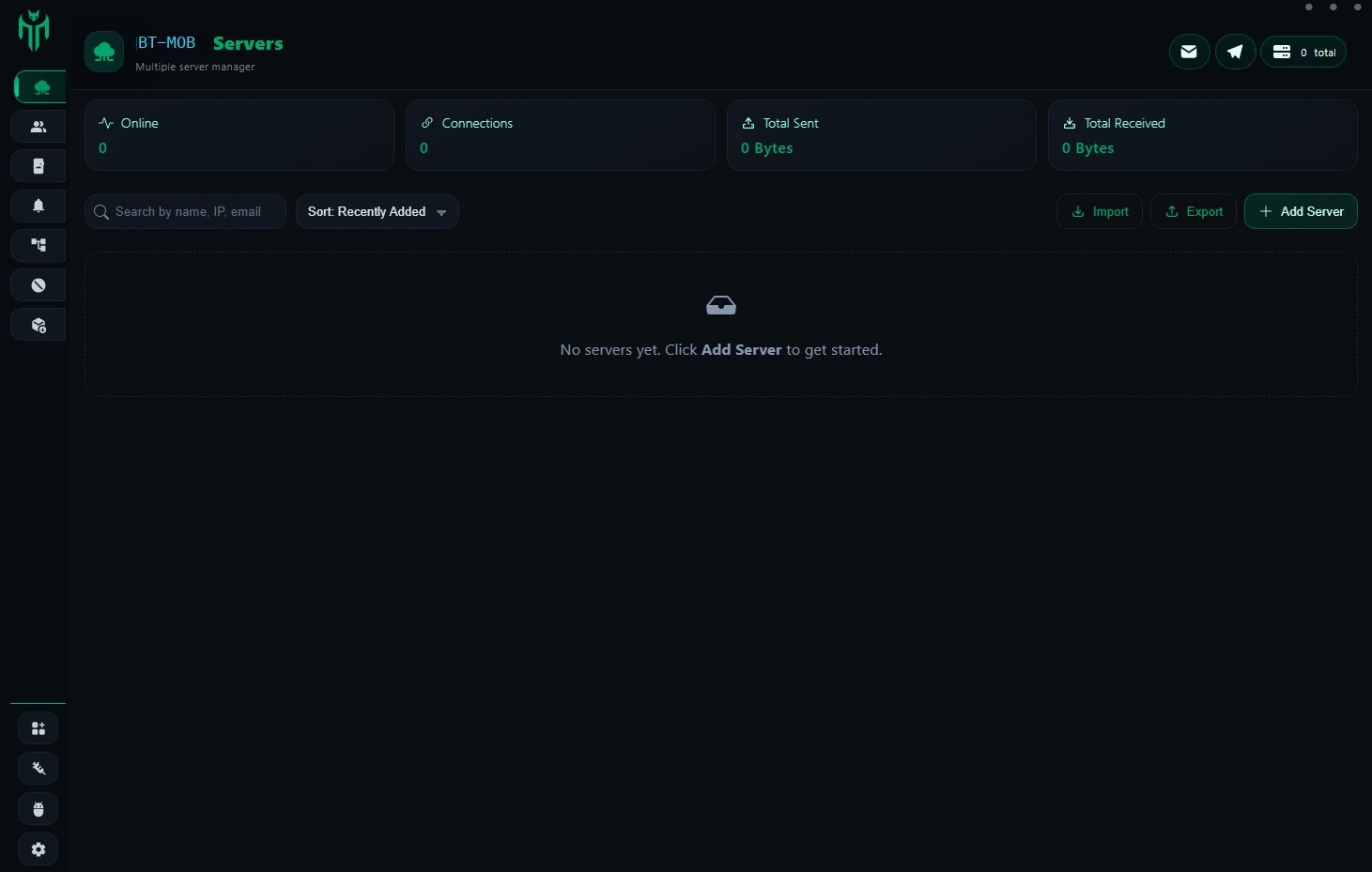
BT MOB panel overview listing enrolled devices with live connection counters
800+
Tools availablespread over 24 independent modules
12
Android releasescovered from 6 up to 17
0
Root needednone — stock devices are fine
24
Control modulesremote, files, screen, logs and more

Watch it in action

BT MOB demo preview
Play demo
Modules

Twenty-four modules. One panel.

Device Overview
A live read on each enrolled handset: battery level, signal strength, build version and the last time it checked in. Values refresh on their own, so there is nothing to reload.
Quick Search
Type a few characters and the device you want is already at the top. Narrow the list by name, ID, Android version or online state, with the whole fleet on one page.
Device Control
Lock, restart or factory-reset a handset from your desk. Commands and settings land on the device without anyone picking it up.
Reconnection
Dropped connections look after themselves. After a reboot, a lost signal or an agent restart, the handset checks back in on its own and rejoins the panel.
App Management
Push, pull or freeze apps across the fleet in one pass, and see at a glance what is installed on any single handset.
Server Options
Keep several server instances configured side by side. Moving between them leaves every active session exactly where it was.
Bulk Actions
Fire commands, configs or scripts at hundreds of handsets at once. Target them by group, by Android version, or by picking individual IDs.
Activity Logs
Every action taken on every handset, written down and time-stamped. Filter the trail, export it, and find nothing missing.
Real-time Alerts
The moment a handset drops off, crosses a rule or needs a human, you hear about it. Thresholds can be set per device or across the fleet.
Data Management
Reach the data sitting on any enrolled handset, move it around, and keep an eye on how much space is left and what has been transferred.
Live Updates
When a build or config is ready, send it. Handsets take the update quietly in the background, with nothing for the user to tap.
File Manager
Walk the whole file tree on a remote handset. Move files in and out, rename them or clear them out, without the device leaving its owner's pocket.
Messages Management
SMS threads and in-app conversations from enrolled handsets, searchable by contact, date range or keyword.
Contacts & Calls
The complete address book and call history from any handset. Pull the records out, or watch call activity as it happens.
Apps Management
A per-device inventory of everything installed. Install, remove or restrict individual apps from the panel.
Input Tracking
Keystroke activity on managed handsets, written to a log for compliance reviews and audit trails.
Browser Tracking
The complete browsing record from enrolled handsets: which sites were opened, how long each session ran, and what was searched for.
Location Tracking
Coordinates that keep themselves current, plus the route history behind them. Draw geofence zones and get told when a handset crosses one.
Chat Access
Conversations from the big messaging platforms, each message carrying its own timestamp.
Clipboard Access
Whatever is copied on an enrolled handset is captured as it happens, with no interaction from whoever is holding it.
Notifications View
Every notification that lands on an enrolled handset, including the ones from apps that have no web version at all.
Screen Access
The current display of any enrolled handset, streamed into the panel as it changes, with no heavy streaming stack in between.
Screen Lock
Kill the display on any handset straight from the panel, including one that is being used at that moment.
Device Profile
Hardware specs, SIM details, IMEI, build number and linked accounts, collected onto one page per handset.

Inside the 800+ tools that ship with BT MOB

Each of the 24 modules in BT MOB works on its own and carries its own set of functions. The breakdown below shows what each one covers, straight out of the box.

Device Control
120+ features
  • Remote lock, reboot, wipe — one-click or scheduled
  • Silent APK install & uninstall across bulk devices
  • Volume, brightness, ringtone & do-not-disturb control
  • Battery saver enforcement, airplane mode toggle
  • Custom device naming, group tagging, fleet labels
  • Offline command queue — executes on reconnect
Live Monitoring
95+ features
  • Real-time screen viewer — no root, no app visible
  • Front & rear camera remote capture
  • Ambient microphone recording on demand
  • Live keystroke logging with app context
  • Clipboard read in real time
  • Network traffic summary per app
Communication Access
110+ features
  • Full call log — inbound, outbound, missed, duration
  • SMS read, send, and intercept by keyword
  • WhatsApp, Telegram, Signal message read
  • Contact list export with photo & notes fields
  • Email account detection & draft read
  • Social media notification capture
File Manager
80+ features
  • Full remote filesystem browser — internal & SD
  • Upload, download, move, delete, rename files
  • Photo gallery & video thumbnail preview
  • Document reader (PDF, DOCX, XLSX)
  • Archive extraction and compression
  • App private folder access on enrolled devices
Location & Network
75+ features
  • GPS location tracking with history timeline
  • Cell tower triangulation fallback (no GPS needed)
  • Wi-Fi network scan & saved passwords
  • VPN detection & active connection details
  • Geofence alerts with configurable radius
  • IP address, carrier, roaming status live feed
Logs & Reports
90+ features
  • Full activity timeline per device with timestamps
  • App usage statistics — open count, duration, frequency
  • Browser history from Chrome, Firefox, Samsung
  • Search query capture across major engines
  • Exportable reports (CSV, JSON) with date filters
  • Multi-device comparison dashboard view

What customers say

★★★★★

"Six months on the lifetime plan and the panel hasn't fallen over once. The file manager and screen view do what the page says they do. No odd behaviour I've had to work around."

MK
Marcus K.
IT Administrator
★★★★★

"Fresh location every thirty seconds instead of the five-minute gap I put up with before. Alerts actually arrive. That difference by itself paid for the move."

DL
Diana L.
Fleet Operations Manager
★★★★★

"Eighty handsets used to eat half my week. Bulk actions pulled that down to a couple of hours. And the activity log means I stop chasing people for explanations."

TR
Tom R.
System Administrator
★★★★★

"Took the source package. The code is tidy and actually commented, which I was not expecting. We had a custom build running inside two days. The $2,000 was the easy part of the decision."

AV
Alex V.
Software Developer
★★★★★

"App management plus live updates is the pairing I needed. Push a build, it lands quietly, the handsets keep working. Nobody gets a popup, nobody gets interrupted."

JN
James N.
DevOps Engineer
★★★★★

"Reconnection is the quiet hero of this panel. Handsets drop off and come back with no re-enrollment from me. Three server instances running side by side and they never trip over each other."

SP
Sofia P.
Network Engineer
★★★★★

"Browsing history and the notification view together give me the whole picture on our field handsets. When something goes sideways I'm not guessing any more."

OB
Oliver B.
Security Analyst
★★★★★

"Device profiles open instantly even on our older handsets. Every field I reach for is on that page — IMEI, SIM, build number, linked accounts. Nothing hidden three menus deep."

RH
Rachel H.
IT Support Lead
★★★★★

"Search has the handset picked out before I've finished typing the name. Small thing, but it compounds when you do it fifty times a day. Whoever built this panel clearly uses it."

CW
Chris W.
Operations Technician

Pay once. No subscription, ever.

Lifetime License
The whole panel, all 24 modules and every update we ship later. One payment, nothing recurring.
$700
single payment · access for life
  • All 24 modules
  • Lifetime license
  • All future updates included
  • Android 6–17 support
  • Multi-device management
  • Activity logs & alerts
  • Source code
Buy lifetime access
FAQ

Questions people ask before buying

What Android versions does BT MOB cover? +
BT MOB reaches from Android 6 up to Android 17, and each major release gets tested before we ship. Samsung, Xiaomi, Huawei, OPPO, OnePlus and the rest of the manufacturers are covered equally. iOS and desktop devices are out of scope.
How does a handset get enrolled? +
A handset joins once the agent APK is installed on it. Launch the app and the device shows up in the panel a few seconds later. There is no QR step, no confirmation email and no MDM profile prompt on the device.
Does a handset have to be rooted? +
No. Location, contacts, messages, call history, the file manager, app management, notifications and the screen view all run on an untouched handset. A handful of advanced functions behave better with root, but nothing requires it to get started.
What happens when a handset goes offline? +
The panel flips the device to offline and stamps the time of last contact. Once the handset is back — after a reboot, a signal drop or an agent restart — it re-registers on its own, and anything queued up is delivered at that point.
Can I host the panel myself? +
Yes. The Source Code plan lets you self-host on any VPS or dedicated machine. The build guide walks through server setup, TLS configuration and pointing the Android agent at your own backend. A fully managed setup is a separate arrangement.
How do Lifetime and Source Code differ? +
Lifetime is a hosted licence: the panel and all 24 modules, paid for once, with nothing recurring. Source Code hands over the codebase itself, so you can change it, rebrand it, host it yourself or build a new product around it. Developers and anyone running their own operation usually take Source Code.
Can more than one admin sign in? +
Several admin accounts can sign in at the same time, each with its own credentials. Permissions are scoped per account, so one admin might only read logs while another holds full device control. Roles are configured in panel settings.
How does data move between the handset and the panel? +
Every packet between enrolled handsets and the panel travels over an encrypted connection, and it only moves when the panel asks for it. The agent sits idle otherwise. Location, for instance, is pulled at whatever interval you configure rather than streamed continuously.
What powers the remote screen view? +
The panel receives the current display directly from the enrolled handset. Nothing is relayed through a third party — the stream comes off your own server. How smooth it looks depends on the handset's connection, and closing the session leaves the device untouched.
Are updates an extra cost? +
No. Updates are included with both plans. New modules, fixes and compatibility work for future Android releases arrive in your installation automatically. Pay once and everything afterwards is covered.
Which payment methods work? +
Crypto only: TRX on TRON, USDT on TRC20 or ERC20, BTC, and ETH. No PayPal, no cards, no bank transfers. Pick a coin, enter your email, and you get a wallet address with a 20-minute window to send the exact amount.
Is there any refund policy? +
Refunds are looked at individually. If something does not work the way it was described, get in touch within 7 days of purchase and we will dig into it. Payments settle on-chain, so any refund is sent manually back to the address you paid from.
Get updates on Telegram